

Needs you, first.
Every question the agent cannot settle comes to one inbox with a recommended answer and an alternative. One tap answers it, from your phone.

Agent Office
595 sets up an AI agent for your business and runs it in the Agent Office: a pixel-art floor where you see every agent, every task, and every question that needs you. Built on Hermes Agent, an open-source agent framework.
The office
Floors by team. Costs by task. Tasks delegated to the agent best equipped with the tools and knowledge to produce to your standard. Running 24/7 in a sandbox. Shown here with sample data.
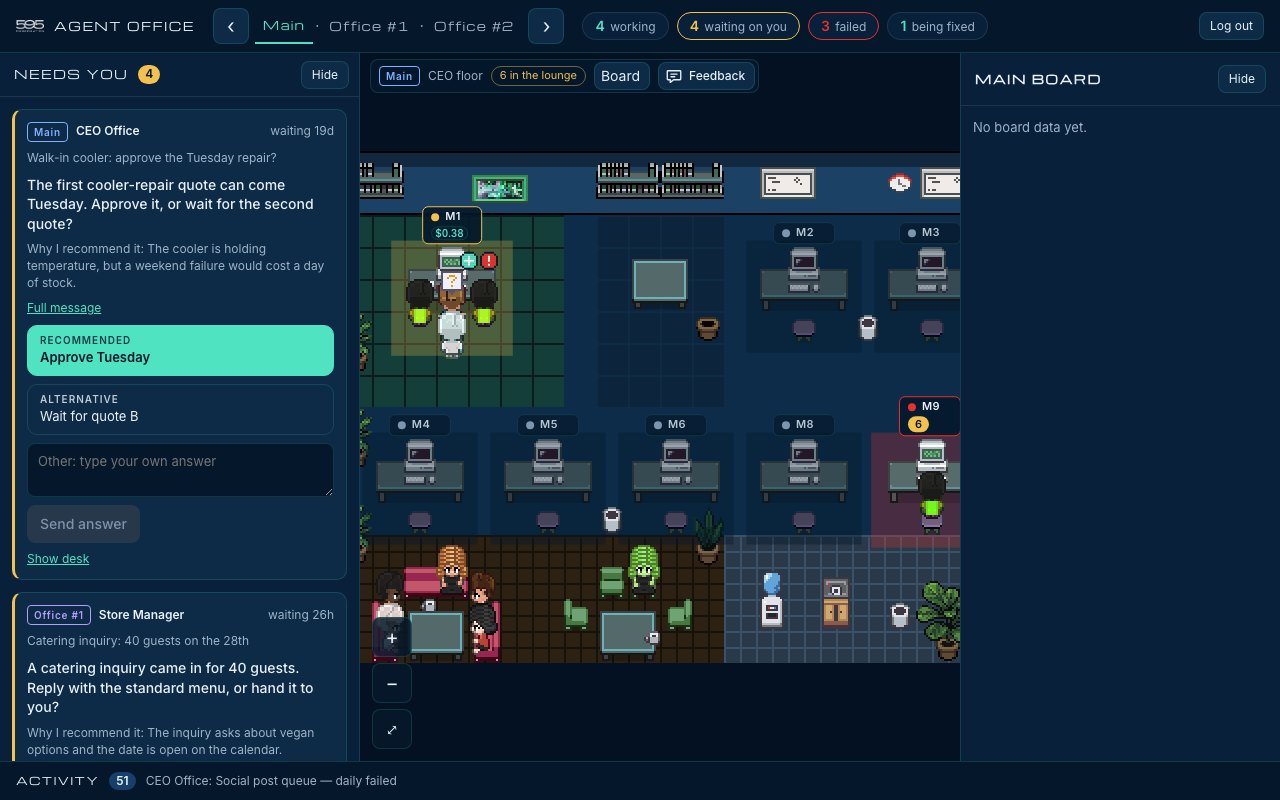
Every question the agent cannot settle comes to one inbox with a recommended answer and an alternative. One tap answers it, from your phone.
Front of house, back office, finance: each team has a floor, each job has a desk, and an idle agent waits in the lounge.
A running task shows its cost at the model's published list price, so a daily digest or a weekly report has a known price before you keep it.
What your agent does
Reads and writes through the tools you already use, with the permissions you choose.
Skills install as plug-ins: invoice filing, a sales digest, social posts, vendor follow-ups.
Daily and weekly work runs on a timer, logged, and stops at the first error.
Anything that sends, posts, pays or publishes waits in your inbox for your yes.
Cost efficiencies
A skill is written once and run as often as you need. The marginal cost of a run is the model time for that run, and nothing else: no overtime, no re-explaining the job.
Routine runs go to a smaller, cheaper model. Hard calls go to a stronger one. The office shows which model ran each task, so the mix is yours to set.
Each task shows its cost at the model's published list price, before you commit to it and after. No surprise at the end of the month.
Connects to the tools you already use








These and more, through standard connectors. Which ones your agent gets, and what each may do, is set in writing during the diagnosis.
How we set it up
The same diagnosis as every 595 engagement, then the skills, the office, and a review rhythm.
The intake and a walk-through show where repeatable work lives: what is typed by hand, what waits on one person, what slips at busy times.
We write the first skills with your rules in them, and connect only the tools each skill needs. You sign off on what the agent may touch.
Your agent gets a floor. You get the Needs-you inbox on any device, a daily summary, and the cost of every task.
Routine work runs on its schedule. Each week we review cost and errors with you, and any skill can be switched off at any time.
Questions
On a server 595 operates for you, or on one you control. Your credentials stay in that environment. They are never stored on this website.
The model is chosen per task. Routine runs use a smaller model, and harder work uses a stronger one. You see which model ran each task.
No, unless you set a written rule for a specific case. By default it drafts, and you approve.
We price after the diagnosis. There is no price list. Model usage is shown per task at list rates.
Yes. Any skill can be switched off, and the whole agent can be stopped. Everything it filed stays in your systems.
Tell us how your business runs. The diagnosis shows where an agent pays, and where it does not.